E3DS Stream Host: stream from your own hardware
E3DS Stream Host is an agent - a small program that runs on your own machine and keeps it connected to Eagle 3D Streaming. With it you stream your Unreal applications from your machine instead of Eagle 3D Streaming's. The app stays on your hardware; Eagle 3D Streaming handles the connection, the link and the session.
Worth doing when the app cannot leave your network, when you already own capable hardware, or when you want a machine reserved for one purpose. Otherwise, uploading to the platform is less work and less to maintain.
Free for non-commercial use. Streaming from your own hardware costs nothing for non-commercial projects, and students and research projects can have the relay sponsored — see stream from your own GPU, free.
Before you begin
- An Eagle 3D Streaming account, for the API key.
- Windows 10, 11 or Server, with a GPU and a good internet connection.
- 7-Zip, and the Unreal Engine prerequisites for the version you build with.
- Disk space on
C:— see the rule below, which is easy to underestimate.
Install it
-
Install the prerequisites
7-Zip, and the Unreal Engine prerequisites for the engine version you build with. These come from Epic, not from Eagle 3D Streaming.
-
Put 7-Zip on the system PATH
Control Panel › System and Security › System › Advanced system settings › Environment Variables. Edit
Path, add a new entry for your 7-Zip folder — usuallyC:\Program Files\7-Zip— and press OK through every window.Then restart the machine. Stream Host will not find 7-Zip until you do.
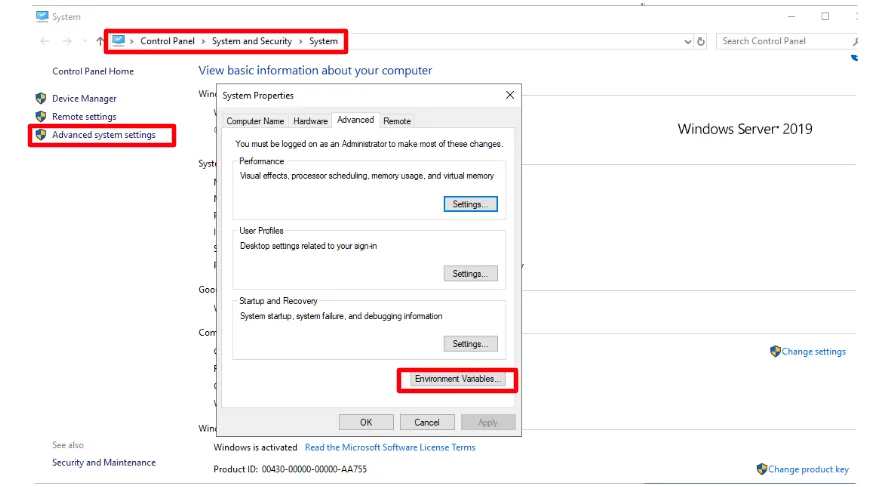
Adding 7-Zip to the Path. -
Download E3DS Stream Host (EL) and extract it to your C: drive
Its program is called EL (
EL.exe), and it comes asEL.zip. Download it from the Control Panel: Utilities › Downloadable Contents › the EL Launcher card › DOWNLOAD. That is the one official place to get it, so it is always the current version.Save it to
C:\and extract it there. The folder holdsEL.exeandrplm.exe;rplm.exeis part of Stream Host and is managed by it — leave it where it is.
The extracted agent: EL.exeandrplm.exe. -
Run it, and give it your API key
Double-click
EL.exe. With no API key yet, it asks "API Key is missing in config.json file. Would you like to login to our control panel to automatically fetch and update the API Key in config.json file?" The API key is what ties the machine to your account.- Yes — sign in to the Control Panel when asked.
Stream Host fetches your key, saves it in
config_EL.jsonbeside itself, and starts. - No, or no answer within 15 seconds — Stream Host
writes
config_EL.jsonwith"apiKey": "INSERT_YOUR_API_KEY_HERE"and closes after five seconds. Get your API key from the Control Panel (API keys and tokens shows where), openconfig_EL.jsonin a text editor, replaceINSERT_YOUR_API_KEY_HEREwith the key, save, and runEL.exeagain.
- Yes — sign in to the Control Panel when asked.
Stream Host fetches your key, saves it in
-
Wait for it to connect
Stream Host runs in a terminal window. Connecting to Eagle 3D Streaming takes one to two minutes; you are finished when it prints Ready to serve pixel streaming.
The Stream Host window prints Ready to serve pixel streaming, confirming Eagle 3D Streaming can see the machine. Until it does, Stream Host is running but not reachable, and a stream sent to it will wait for a machine that never answers.
Start it automatically with Windows
Stream Host does not install itself as a service. If the machine reboots overnight, nothing brings it back unless you arrange it — and the failure looks like a machine that is simply never available.
-
Open Task Scheduler and create a task
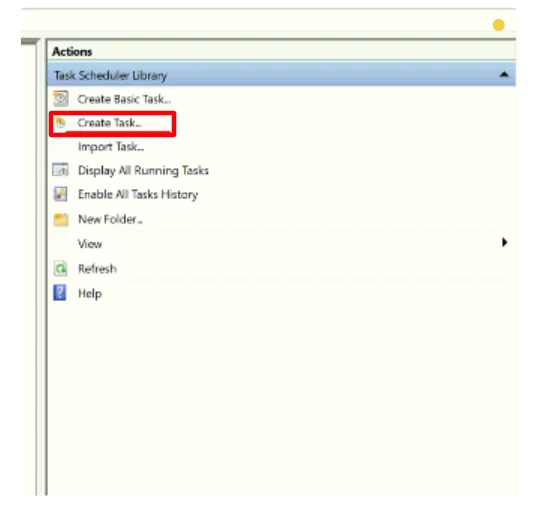
Task Scheduler. -
Trigger: At log on, for any user
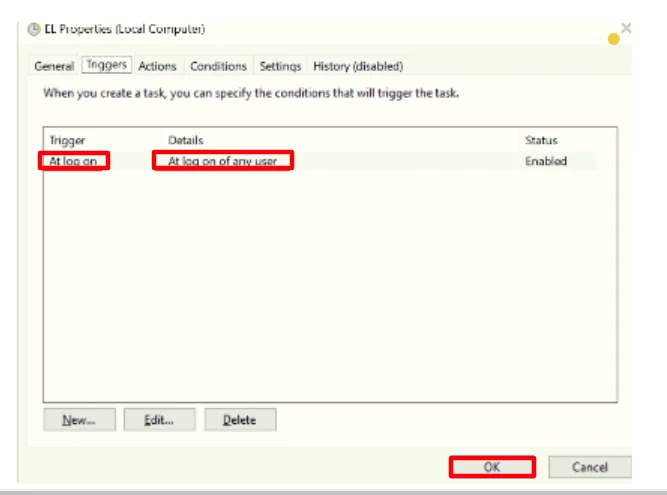
At log on of any user. -
Action: run
EL.exe, with "Start in" set to its folderThe "Start in" path is required, not optional. Without it Stream Host starts in the wrong directory and cannot find
config_EL.json— so it runs, and does nothing. The folder can be anywhere, as long as "Start in" matches the folder in Program/script; the example below usesC:\1.eagle3dstreaming_b_v1\rather thanC:\.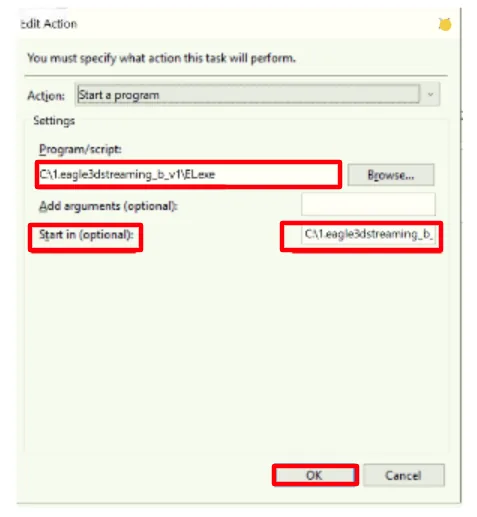
The action, with its working folder.
Keep the app running so viewers connect in seconds rather than waiting for a cold start.
In this section
Last updated