Command-line parameters
A command-line parameter is a value handed to your Unreal application at the moment it starts. Your application decides what any of them mean, so what you can do with them is up to your own code:
- load a particular level
- start the player somewhere specific
- set a resolution or a quality option
- turn a feature of your own on or off
- tell the application which user is watching
The simplest way to send them is the one below, and for most applications it is the only one needed.
The two places a parameter can come from
One is fixed per configuration. The other changes per visitor.
Parameters To Pass To App. In the Control Panel, open the configuration attached to your stream link and go to the Developer tab. The field named Parameters To Pass To App holds a command line that every visitor to that link receives. Use it for anything that is true of the application always.
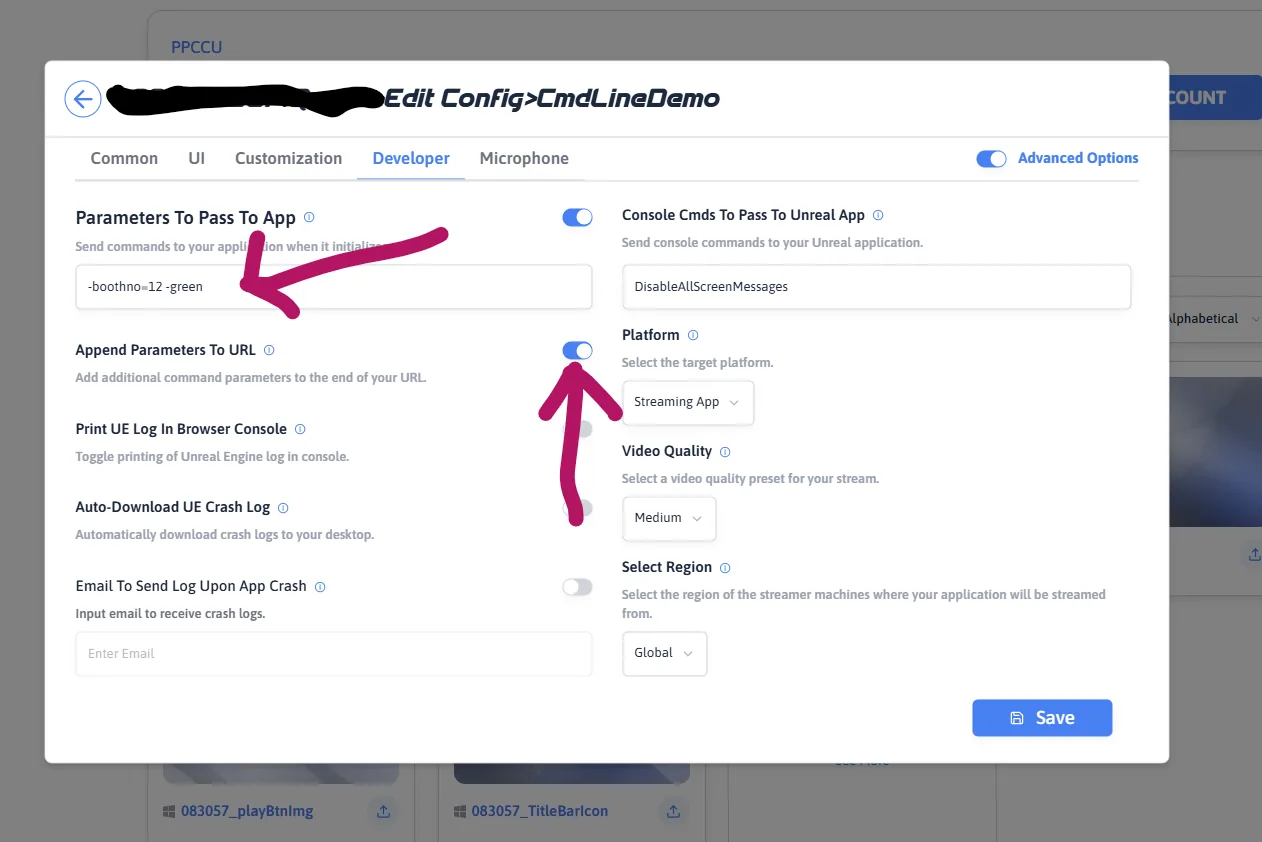
CmdLineDemo configuration.
Parameters To Pass To App holds -boothno=12 -green, and
Append Parameters To URL — the switch that decides
append or replace — is on.
That is the whole of it. Every visitor to that link starts the application with those parameters, and nothing else has to be set up.
The stream link. The other place is the link itself: add
?appParameters= (or the older name, ?exeLunchArgs=)
to the end of the stream link, and the parameters after it apply to that
visit only. That is covered on
parameters in a link.
A demo app that shows the value arriving, one change at a time. Nothing to install.
Per-visitor values, combining both sources, reading them inside your application, and what to do when one does not arrive.
Last updated