Command-line parameters: advanced uses
Everything beyond putting a value in the Eagle 3D Streaming configuration box: sending a different value to each visitor through the link, combining that with the configuration, reading parameters inside your application, and what to check when one does not arrive.
The same parameters, per visitor
The configuration is fixed for everyone. A link can differ for each person.
The stream link. Add ?exeLunchArgs= to the end
of the link and the parameters after it apply to that visit only.
Use this when the parameters depend on who is opening the link, or on where
it was opened from.
?appParameters= is a newer, clearer name for the same thing and
works the same way. If a link carries both, ?appParameters= is
used and ?exeLunchArgs= is ignored. The examples on this page use
?exeLunchArgs=, which every existing link already has.
The link itself comes from the app's Streaming Link tab —
the copy button beside Play puts it on the clipboard, and
?exeLunchArgs=... goes on the end of it:
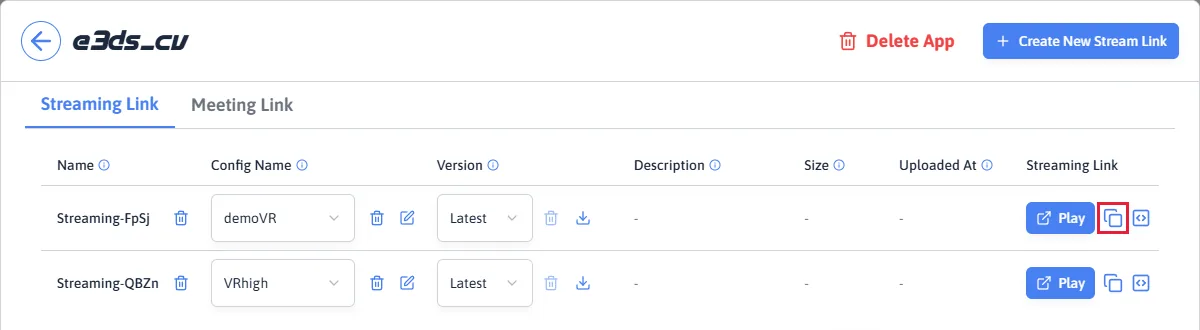
?exeLunchArgs= to.
https://connector.eagle3dstreaming.com/v5/demo/MyApp/MyConfig?exeLunchArgs=-boothno=12 -green
That link starts the application with -boothno=12 -green.
Spaces and the rest: what the browser fixes for you
Write the link with ordinary spaces, exactly as shown above.
A URL cannot carry a space, so the browser replaces it with %20
on the way out, and the application still receives
-boothno=12 -green.
Verified by opening that link in a browser with a real space in it and reading what arrived at the server:
typed into the browser   ?exeLunchArgs=-boothno=12 -green
arrived at the server    ?exeLunchArgs=-boothno=12%20-green
Writing %20 yourself works too and produces exactly the same
result. Neither is more correct — use whichever is easier to read,
which for a link you are writing by hand is usually the space.
An = inside your parameters needs nothing done to
it. A link's value is separated from its name at the first
= only, so every = after that is part of the value
and arrives untouched. -boothno=12 works exactly as written.
Three characters the browser will not rescue
The browser encodes a space because a space cannot mean anything in a URL. These three already mean something, so they are left alone — and they take part of your command line with them:
| Character | Write it as | What happens if you do not |
|---|---|---|
& | %26 |
Starts a new URL parameter. Everything after it is lost from your command line. |
# | %23 |
Starts the page fragment. Everything after it never reaches the server at all. |
+ | %2B |
Arrives as a space. -x=1+2 becomes -x=1 2, which is two parameters instead of one value. |
% | Avoid it | Today even the correct %25 fails: the whole command line from the link is dropped. ?exeLunchArgs=-discount=50%25 -green delivers nothing at all. See the warning below. |
So -a=1&-b=2 in a link delivers only -a=1, and
-b=2 is gone. The application starts, the stream works, and one
of your parameters is simply missing — nothing announces it.
All three matter most for values you did not write by hand: a token, a
signature, a password. Those routinely contain + and
&, so anything generated rather than typed should be
encoded rather than trusted to survive.
The full list of what every character becomes is worth a bookmark: MDN's percent-encoding reference explains which characters are reserved and why, and W3Schools' URL encoding reference is a plain table of every character and its replacement.
When both places are used at once
One checkbox decides whether the link adds to the configuration or takes over from it.
If Parameters To Pass To App holds something and
the link carries ?exeLunchArgs=, one switch decides what the
application receives: Append Parameters To URL, on the same
Developer tab, shown on
command-line parameters.
The default is replace, and that is the one to be sure about.
With Append Parameters To URL off — which is how a
configuration starts — a link carrying ?exeLunchArgs=
replaces what is in Parameters To Pass To App entirely.
Turn the switch on and the link's parameters are added to it instead.
Older documentation described this the other way round; the behaviour is as
stated here.
| Setting | What the app receives |
|---|---|
| Off (the default) | The link's parameters replace Parameters To Pass To App entirely. |
| On | The link's parameters are added after Parameters To Pass To App. Both apply. |
Worked through with one set of values. Parameters To Pass To App holds
-ResX=1280 -MyFlag, and the link carries
?exeLunchArgs=-Level%3DArena:
| Setting | Parameters that reach the app |
|---|---|
| Off | -Level=Arena |
| On | -ResX=1280 -MyFlag -Level=Arena |
Read the first row carefully: with the setting off,
-ResX=1280 and -MyFlag are gone. That is what
replace means, and it is the default. If you want the link to add to the
configuration rather than take over from it, turn the setting on.
One case behaves differently and is worth knowing, because it is the
ordinary one: a link with no ?exeLunchArgs= on it
leaves Parameters To Pass To App completely alone, whichever
way the setting is set. A normal visit can never lose what the configuration
holds. Only a link that actually carries parameters can displace it.
Where your parameters sit, and what that gives you
Yours come first. Eagle 3D Streaming's own parameters follow.
Eagle 3D Streaming adds parameters of its own to every launch — the address of the signalling server, the encoder settings, the window size and others. Your parameters and those are combined into one command line, and yours are placed first.
Being first is what lets you change one of Eagle 3D Streaming's
defaults. Pass -ResX=1920 and it appears in the command
line before Eagle 3D Streaming's own -ResX, so yours is the one
Unreal reads. Nothing is deleted to make that work — both values are
present, and position decides.
It also means nothing removes a parameter you supplied. If
you put -RenderOffScreen in your configuration, it reaches the
application even on a machine where Eagle 3D Streaming would not have added
it itself. What you ask for is what the app gets.
Not fully measured. Overriding relies on Unreal reading the
first occurrence of a repeated parameter. That is how
FParse::Value works, which is what reads a
-Name=value parameter. A setting your app reads as a console
variable instead may take the last occurrence. If an override does not take
effect, this is the first thing to suspect — and worth telling support
about, because the answer belongs on this page.
The same parameters without a link
Every one of those links has an equivalent configuration command line.
Anything that can go in a link can go in Parameters To Pass To App instead, written the same way but without any URL encoding — it is not a URL, so spaces are just spaces:
| As a link | In Parameters To Pass To App |
|---|---|
?exeLunchArgs=-boothno=12 -red | -boothno=12 -red |
?exeLunchArgs=-boothno=12 -pink | -boothno=12 -pink |
?exeLunchArgs=-boothno=12 -green | -boothno=12 -green |
So why use links at all? Because a configuration command line is one fixed value for everybody. To hand one visitor green, another red and another pink, three configurations have to exist — three stream links, three sets of settings to keep in step, and a fourth colour means a fourth of everything.
That is merely annoying for three colours. It stops working entirely at the thing people actually want it for: telling the application who is watching. A username or a login token is different for every single visitor, so doing it through configurations would mean one configuration per user — a thousand users, a thousand configurations. There is no version of that which is workable.
That is what ?exeLunchArgs= exists for. One
configuration and one application, with the per-visitor part carried by the
link:
...?exeLunchArgs=-username=alice
...?exeLunchArgs=-username=bob
Alice and Bob open the same stream link with different values on it, and the application knows which of them is watching. From there it is an ordinary named value: read it in Blueprint or C++ and the application can greet them by name, load their saved state, show only what they are allowed to see, or take a login token and verify it against your own server before showing anything at all.
A link is visible to the person who opens it. Anything put on a URL can be read and changed by the visitor, so a value that decides what someone is allowed to see should be a token your own service can verify, not a plain username the application trusts on sight. If your application has no use for parameters from links at all, they can be switched off entirely — see Turning off parameters from links below.
Reading a parameter inside your application
Two ways in: C++ at startup, or Blueprint once the level has loaded.
There are two places your application can read the command line, and they happen at different moments:
| When it runs | Use it for | |
|---|---|---|
| C++ | While the engine is still starting, before any level has loaded and before the stream has begun. | Anything that has to be decided before the map exists — which map to load, whether to run in a particular mode at all. |
| Blueprint | Once a level has loaded, on Begin Play or later. | Anything about the world — where to place the player, what colour to make an object. The demo does all of its work here. |
The command line is the same in both. Only the timing differs, and the difference matters: a Blueprint cannot act before its level exists, so a parameter that decides which level to load has to be read in C++.
In C++, during startup
Unreal treats two kinds of parameter differently, and the difference catches people out badly enough to be worth stating plainly.
A bare switch is present or absent and carries no value:
-MyFlag. Read it with FParse::Param:
bool bMyFlag = FParse::Param(FCommandLine::Get(), TEXT("MyFlag"));
A named value carries a value after an =:
-Level=Arena. Read it with FParse::Value, and note
the trailing = inside TEXT():
FString Level;
bool bHasLevel = FParse::Value(FCommandLine::Get(), TEXT("Level="), Level);
They are not interchangeable. Using
FParse::Param on a named value returns false on
every launch, even though the parameter is right there in the command line.
FParse::Param checks the character immediately after the name
and accepts only a space or the end of the line — and a named value has
an = there.
| Command line | Read with | Result |
|---|---|---|
-MyFlag | Param("MyFlag") | true |
-Level=Arena | Param("Level") | false, always |
-Level=Arena | Value("Level=", Out) | true, Out is Arena |
Adding the = to FParse::Param does not fix it. It
only moves the problem: Param("Level=") then matches when the
value has been accidentally separated from its parameter, which is to say it
reports success exactly when the value is unusable.
This is not a capitalisation problem.
FParse::Param ignores case on both sides, so
MyFlag, myflag and MYFLAG all behave
the same. If a check is failing, the function is the thing to look at, not
the spelling.
The mistake to avoid
This is the one that costs real time, and it has cost it more than once. Do not do this with the booth number from the example at the top of the page:
// WRONG - returns false on every launch
bool bHasBooth = FParse::Param(FCommandLine::Get(), TEXT("boothno"));
-boothno=12 is a named value, so
FParse::Param reports false even though
-boothno=12 is sitting in the command line. Do this instead:
// RIGHT
FString Booth;
bool bHasBooth = FParse::Value(FCommandLine::Get(), TEXT("boothno="), Booth);
-green is the other case, and there
FParse::Param is exactly right:
// RIGHT - -green is a bare switch
bool bGreen = FParse::Param(FCommandLine::Get(), TEXT("green"));
What makes this expensive is how it fails. Nothing errors. The parameter is passed correctly, it arrives correctly, it is in the application's command line — and the check quietly says no. Time then goes into the link, the encoding and the configuration, none of which are wrong, while the fault is one word in the application's own source.
It is also worth knowing that a check written this way can appear to work for months. If a condition combines several parameters:
if (bHasBooth || bHasIP || bHasRenderOffScreen)then one working check carries the whole condition, and the two broken ones are invisible. The day anything changes about the one that works, the condition fails and it looks like a new problem — when in fact two of the three had never worked at all. If a parameter matters, test it on its own.
In Blueprint, once the level has loaded
Blueprint does not have FParse. What it has is a node that
returns the entire command line as one string —
Get Command Line — and everything after that is string
handling you do yourself.
The pattern the demo uses, and the one to copy:
-
On Begin Play, call Get Command Line.
It returns something like
-boothno=12 -green -PixelStreamingURL=ws://...— your own parameters and the platform's together, in one string. - Split it on spaces into an array, so each parameter is one entry.
-
Handle the two kinds separately. For a named value like
-boothno=12, find the entry starting with-boothno=and take what follows the=— that is the booth number, as text, ready to convert to an integer. For a bare switch like-green, you are only asking whether that entry is in the array at all. - Act on it. The demo looks up the booth with that number and moves the player there, then walks the array in order applying the first colour it recognises to the ball, the next to the cone, the next to the box — which is why order decided which object changed in steps 4 and 5 of the demo.
Timing is the thing to watch. A Blueprint runs when its level loads, which is after the engine has started and around when the stream becomes available. That is early enough to place a player or colour an object before anyone sees it, and too late to choose which level loads. If a parameter has to decide that, read it in C++ as above.
The demo's own Blueprint is the best reference. It does exactly the four steps above, for both a named value and a bare switch.
Values Eagle 3D Streaming can fill in for you
Placeholders for things you cannot know when you write the configuration.
Some values are only decided when a machine is assigned, so they cannot be typed into a configuration ahead of time. Write a placeholder instead and it is replaced at launch:
| Placeholder | Replaced with |
|---|---|
%ip_ss% | The address of the signalling server for this session. |
%port_streamer2ss% | The port the application connects to that server on. |
%ip_streamer% | The public address of the machine the app is running on. |
%instance_id% | The identifier of that machine. |
%vm_region% | The region the machine is in. |
So a configuration command line of -MyServer=%ip_ss% starts the
application with -MyServer=10.0.0.5 when the session is served
from a machine at that address.
Placeholders work in both places — Parameters To Pass To App and
?exeLunchArgs= on the link.
Turning off parameters from links
For applications that should not accept anything from a URL.
A link can be edited by whoever holds it. That is the point of the feature when you are passing a username, and a liability when you are not: a visitor can add parameters of their own choosing to the end of a stream link and the application will be started with them. That includes Unreal's own parameters, not just the ones your application knows about.
If your application never needs per-visitor parameters, switch the whole thing off for that configuration. Parameters from links are then ignored completely — only Parameters To Pass To App is used, and it makes no difference what a visitor puts on the URL or how Append Parameters To URL is set.
| Setting | A link carrying ?exeLunchArgs=-blue |
|---|---|
| Parameters from links allowed (the default) | -blue reaches the application, appended to or replacing Parameters To Pass To App. |
| Parameters from links turned off | -blue is discarded. The application starts with Parameters To Pass To App only. |
It is allowed by default, so nothing changes for any configuration that exists today, and everything else on this page continues to describe what happens. Turning it off is a deliberate choice for an application that does not want it.
An attempt that gets refused is recorded, with what the link tried to pass. If you suspect someone is experimenting with your links, that is what to ask support for.
Availability. The streaming platform honours this setting now. The switch for it is still being added to the Developer tab, so if you want it applied to a configuration before it appears there, ask support and it can be set for you.
If a parameter does not seem to arrive
In the order worth checking.
-
Does the link contain
&,#,+or%? They must be%26,%23and%2B. The first two cut the rest of the command line off and the third turns into a space, all without any warning. A%, even written as%25, currently loses the whole link command line. Spaces are fine as they are — the browser encodes those — and an=inside your parameters is fine too. Neither is the problem. -
Is the append setting what you think? With it off, a link
carrying
?exeLunchArgs=replaces the configuration's command line completely. Parameters you expected from the configuration will be absent. -
Is the app reading it with the right function? A
-Name=valueparameter read withFParse::Paramreturns false however correctly it was passed. See the section above. - Is another parameter of the same name set earlier? Your own two sources are combined in order — configuration first, then the link — so with the append setting on, a configuration value for the same parameter comes before the link's.
If all four check out, contact support with the stream link and the parameter you expected. The command line each application was started with can be looked up for a session.
Last updated