Open and redirect URLs
Send the viewer to a web page from inside your streamed Unreal app — either in a new tab, leaving the stream running, or in the current one, ending it.
| Node | Effect | The stream |
|---|---|---|
| E3DS Open Url | Opens the address in a new tab. | Keeps running. The viewer comes back to it. |
| E3DS redirect To | Navigates the current tab away. | Ends. There is nothing to come back to. |
A spec sheet, a product page, a form to fill in — open a new tab, so the configuration they built is still there afterwards. Redirect only at a genuine end point, such as handing off to a checkout, because it discards the session and everything in it.
Opening a new tab
Features API › Open a URL: the same from your own page (iframe or Web SDK) or from your Unreal app, with demos and troubleshooting.
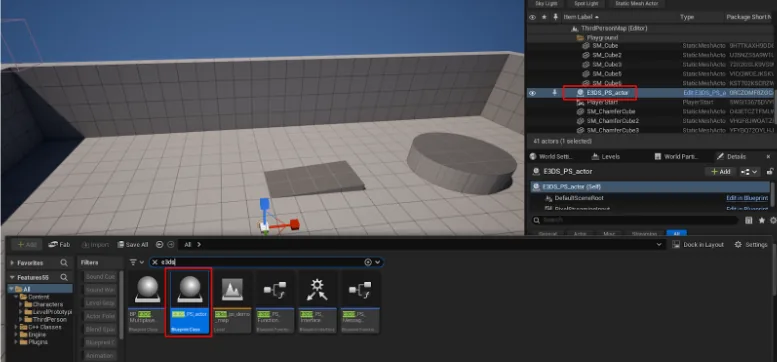
Place BP_E3DS_PS_Actor from the plugin content into your level.
From any actor, call E3DS Open Url and put the full address, starting with
https://, in Url To Open.
Two things make the new tab fail, and both are reported back to your app:
| Cause | reason in the reply |
|---|---|
The address has no scheme — www.example.com instead of https://www.example.com. |
invalid url |
| The browser blocked the pop-up. A new tab opened without a recent click or key press from the viewer can be blocked. | popup blocked or failed to open |
Every request gets a reply sent back to Unreal as a Pixel Streaming input
message, with result (success or
failed), reason when it failed, and
receivedMsg holding the request it answers. Listen for it if your
app needs to know the tab actually opened.
Redirecting the current tab
-
Place a BP_E3DS_PS_Actor in the level you are streaming.
-
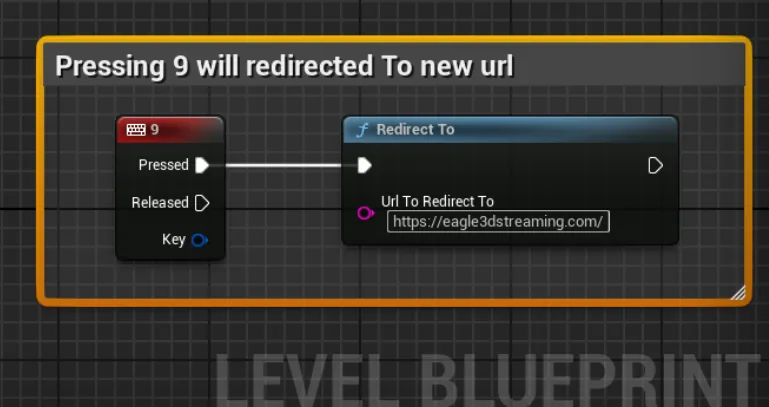
In the Level Blueprint, add your trigger — the demo uses the 9 key — drag from its Pressed pin and add E3DS redirect To. Put the full address in Url To Redirect To, then compile and save.
Without the plugin
Both nodes wrap a message you can send yourself. Add a PixelStreamingInput component to an actor and send the string with Send Pixel Streaming Response:
{"cmd":"launchUrl","value":"https://www.eagle3dstreaming.com"}{"cmd":"redirectTo","value":"https://www.eagle3dstreaming.com"}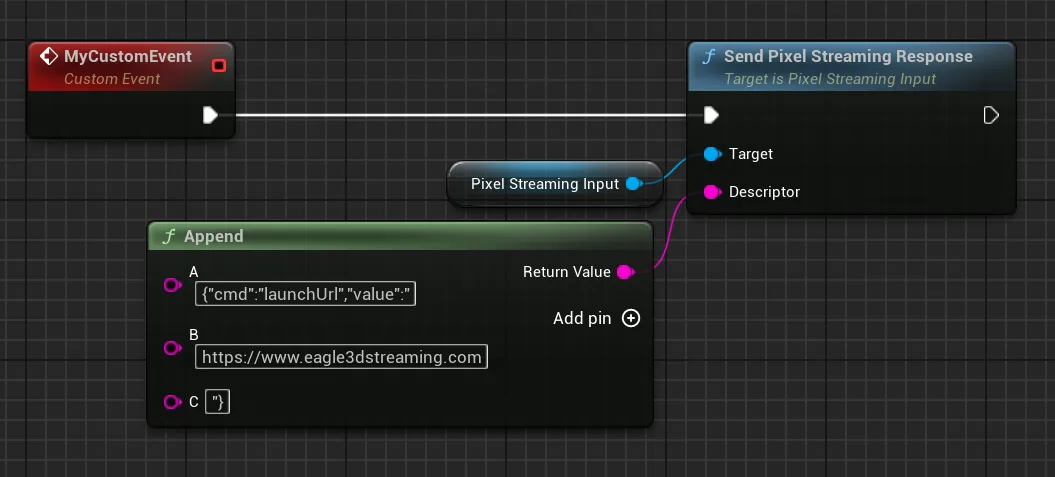
Finding out what the viewer is on, so your app can respond to it.
Last updated