Capture a screenshot
Capture the current frame of a Pixel Streaming stream from inside your Unreal app, and hand it to the viewer as a PNG download.
What it captures
The capture is taken in the viewer's browser, from the video they are watching: the current frame of the stream, at the stream's resolution, exactly as it arrived — compression included. On a poor connection the image is as soft as the stream is at that moment. What the node gives you is the trigger inside your app: one key press or button, and the frame is saved without the page, the controls or the rest of the screen around it.
A PNG file named <timestamp>_screenshot.png — for
example 1767225600000_screenshot.png — in their browser's
downloads.
The Blueprint
Put a BP_E3DS_PS_Actor in the level you are streaming.
Call E3DS capture ScreenShot from wherever the capture should happen — a Level Blueprint key press, a button in your UI, the end of an animation.
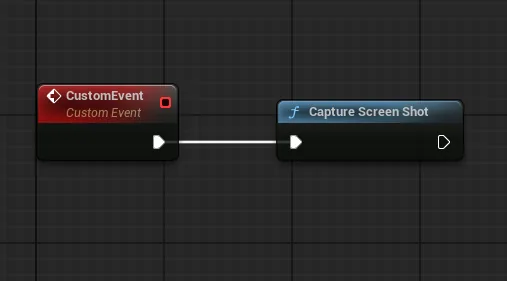
That is the whole of it. The plugin sends the request, the viewer's browser captures the frame, and the image downloads there.
Without the plugin
The node is a wrapper around a message, so you can send that message yourself. Add a PixelStreamingInput component to an actor in the level and send this with Send Pixel Streaming Response:
{"cmd":"captureScreenShot"}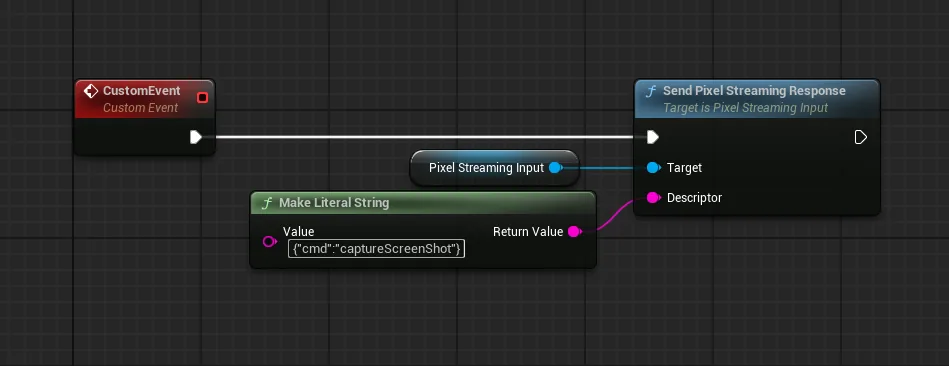
Other ways to trigger it
A screenshot can also be requested from the page rather than the app, which is what you want when the button lives in your own interface rather than in Unreal. See controlling the stream.
Sending other files to the viewer, and receiving files from them.
Last updated