Why a session ended
An Eagle 3D Streaming stream can end for many reasons, and every one of them reaches your page as one short string written for a person to read. Below is every value that string can currently take, each entry closed until you want it. This page is the single list for both integrations — the web SDK and the iframe receive the same set, so the guides point here instead of keeping two copies that would drift apart.
How it reaches you
Two integrations, two mechanisms, identical strings. Whichever you are using, the list below is the one to build against.
Web SDK — a callback
e3ds_controller.callbacks.onSessionEnding = function (message) {
    showMyEndScreen(message);
};
Iframe — a posted message
window.addEventListener("message", function (event) {
    var data = event.data || {};
    if (data.type !== "sessionEnding") return;
    showMyEndScreen(data.message);
});| When it fires | Any time the session ends, for any of the reasons below. |
message | A single string, written for a person to read. It is the reason, already phrased — not a code, not an object. |
| Assign it | Before the stream starts. In the sample that is why sdk-token.js loads last. |
| Returns | Nothing. It is a notification, not a veto — by the time it fires the machine is already released. |
What the message can be
Scan the titles; open the one you need.
1You kicked the viewer outYou have been kicked out
The Control Panel lists every session running on your account and lets you end any one of them.
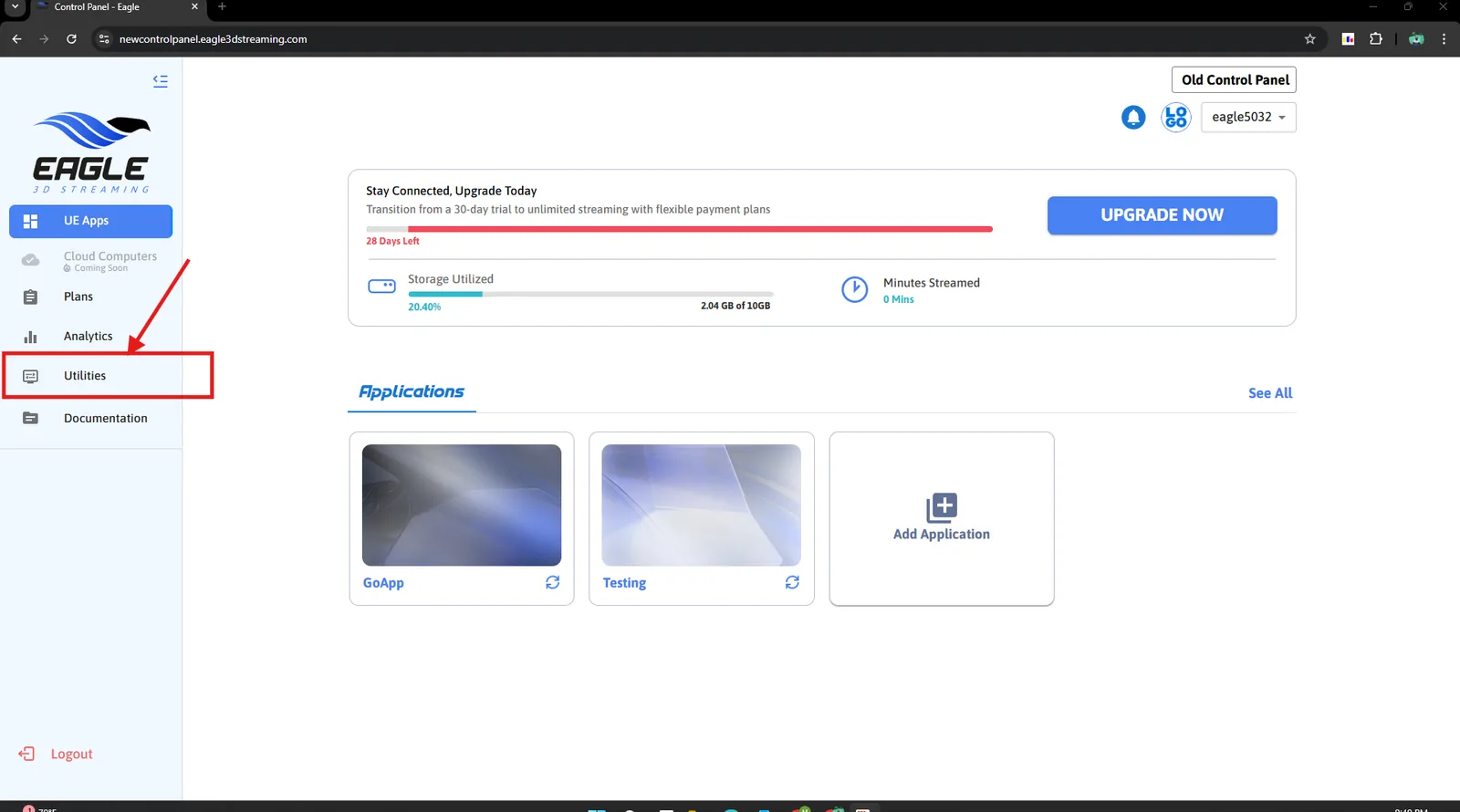
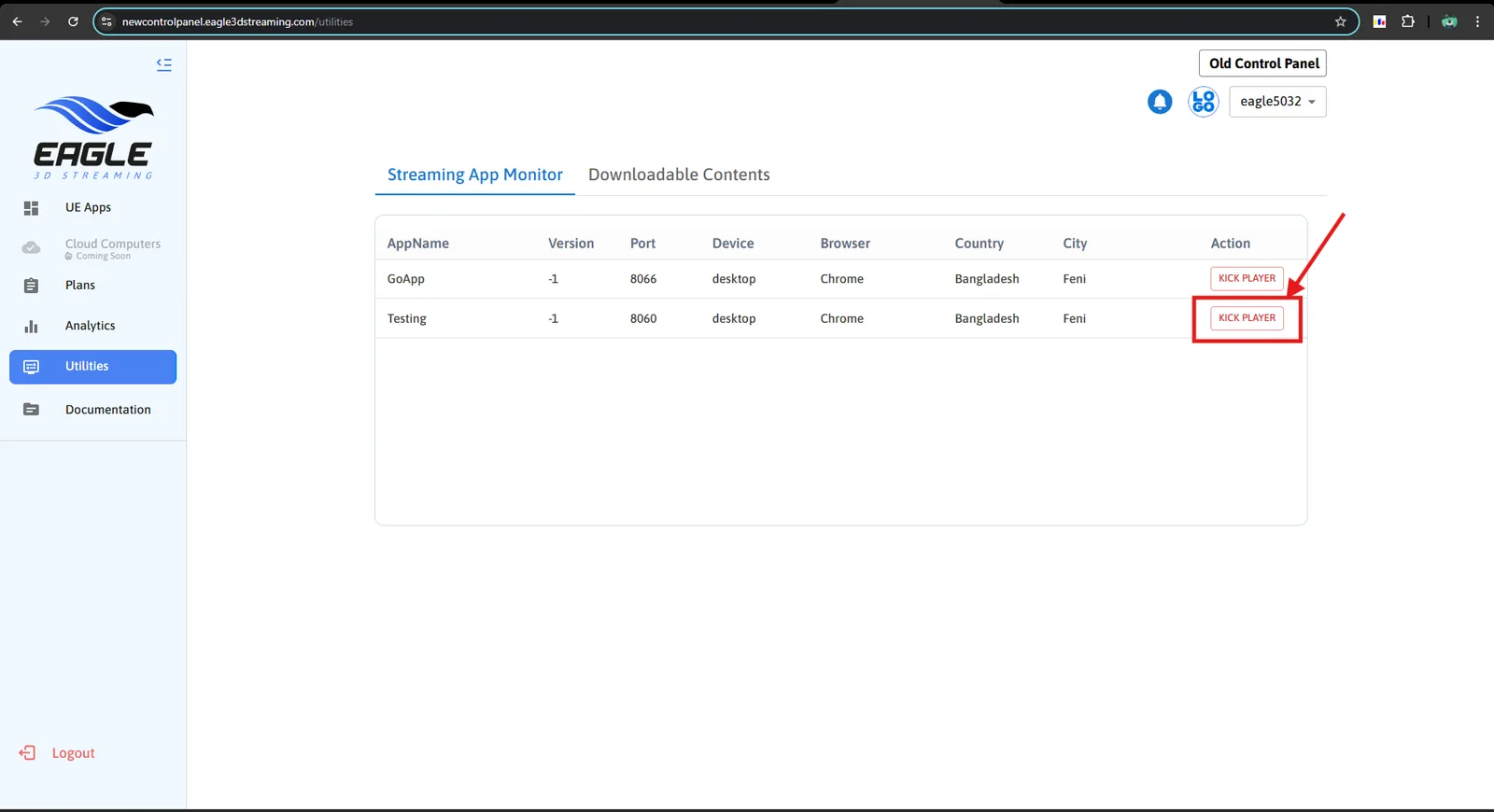
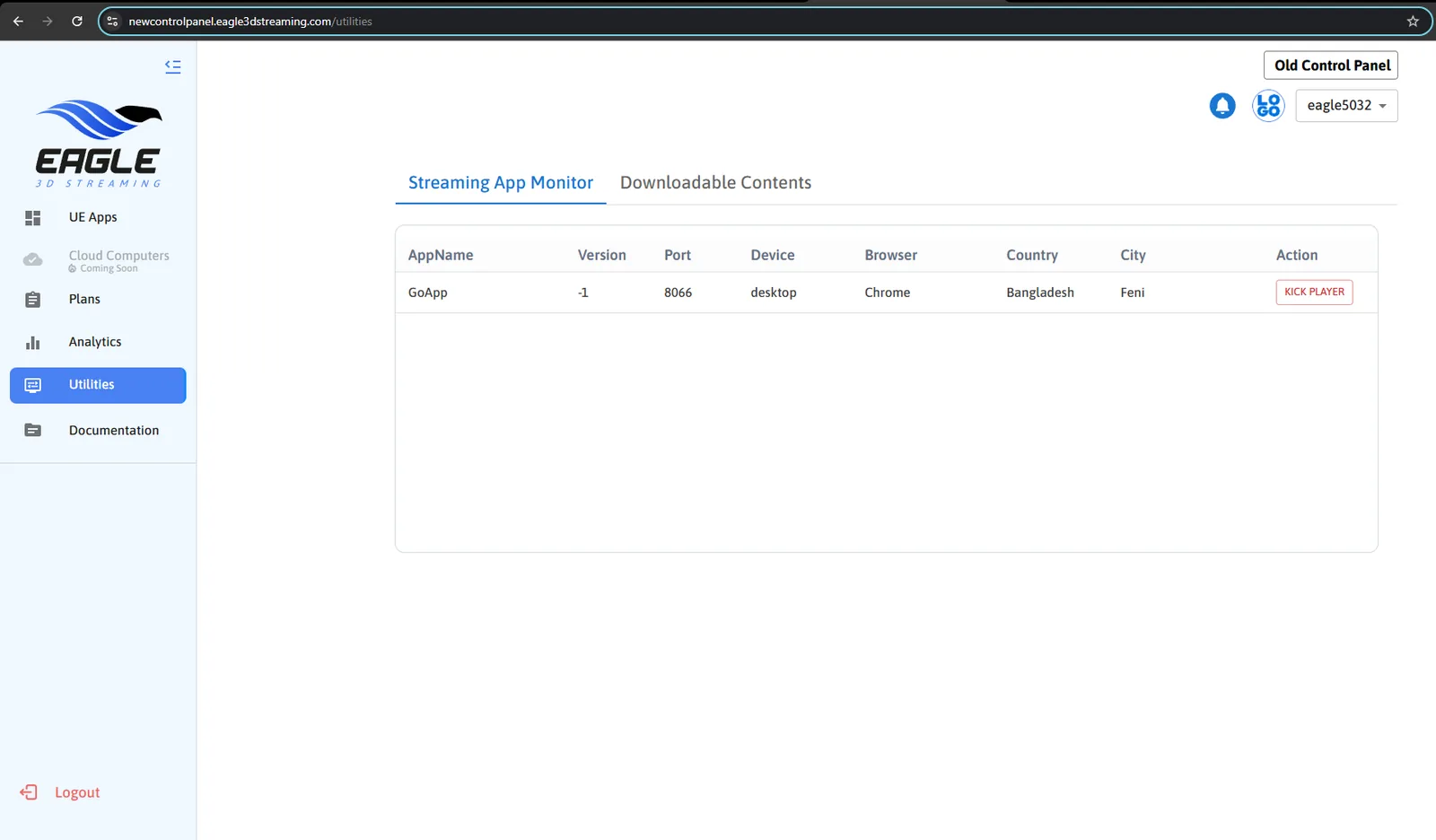
On the Eagle 3D Streaming player this draws a "session has ended" screen. In an SDK integration nothing is drawn for you: the message arrives at the callback and the viewer sees whatever you build from it.
Which makes it how you test your end-of-session screen. Start a session, kick it from Utilities, and watch your screen appear from a real event rather than from calling the callback by hand.
2The session reached its time limitSession lasted for <duration>. Session expired.
You set a maximum session length in the application configuration. When a session reaches it, it ends — during perfectly normal use, with nothing wrong. Set an hour and this arrives after an hour.
Where the setting lives, and what else governs how long a session runs: sessions and access.
3The viewer went idleYou have been disconnected due to inactivity.
AFK — away from keyboard. The session watches for input, and when none arrives for long enough it warns the viewer with a countdown. If they still do nothing, it ends and this message is delivered.
Enable it with Log Out Automatically After Inactivity and set the two timings, on the Common tab of your application configuration — see sessions and access. There are two values, and they do different jobs:
| Setting | What it controls |
|---|---|
| Minutes Until Log Out Countdown Starts | How long without input before the viewer is warned. The countdown appears; any input cancels it and nothing ends. |
| Log Out Countdown Timer Length | How long the countdown runs. Reach the end of it and the session closes. |
A forgotten tab consumes minutes and holds a concurrent slot at exactly the same rate as somebody using it. Of everything in this list, this is the one ending you should want to happen.
4Your application crashedApp Crashed
The Unreal application stopped unexpectedly. The session ends because there is nothing left to stream.
This one is about your build rather than the platform, so it is the entry worth acting on rather than displaying. Common causes are memory and GPU limits — see the hardware budget and optimise your app.
A crash your viewer sees and you do not hear about is the worst case in this list. Send it to your own logging in the callback, so a pattern across sessions is visible to you rather than only to whoever hit it.
5A meeting host closed the meetingHost's Streaming Closed
In a meeting the host's session is the one that matters. When the host leaves, every guest ends with this. Expected behaviour, not a fault.
6The link expiredUrl Expired
The streaming link itself carried a lifetime and it has passed. See sessions and access for where link expiry is set.
7The machine is not onlineThe machine "<name>" is not currently online…
A specific machine was requested and it is switched off, or the name does not match. Relevant when you run your own GPU; the name is the one you gave that agent.
8No machine is freeThe requested exe launcher is currently busy…
Every machine that could run your app is occupied. Nothing is broken and nothing needs fixing in your integration — it is a capacity condition, and trying again shortly usually succeeds.
If it is constant rather than occasional, see capacity and regions and preallocation.
9The account cannot streamUser <name> not found · no subscription · expired · maxUserLimit
Four messages, one cause: the account rather than the viewer.
| Message | Means |
|---|---|
User <name> not found. Please register from… | No such account — almost always a typo in userName. |
User <name> does not have an active subscription… | The account has no plan. |
User <name> subscription expired. Please renew… | The plan lapsed. Plans and billing. |
User <name> has reached maxUserLimit of <n> | Your concurrent-user limit is full. |
10The password was wrongYou did not enter the correct password…
A password-protected link, answered incorrectly. See sessions and access.
11The token did not verifyToken verification: <reason>
The session token was rejected — expired before it was used,
malformed, or issued for a different application. Most often a token that
sat too long between being fetched and being handed to
main().
Keeping your API key off the browser covers where tokens come from and how long they last.
12The Unreal version is not supportedYour application is running on UE4.27…
The build is on Unreal 4.27, which the platform no longer supports. Upgrading to 5.1 or later is the only fix — see supported versions.
New endings arrive as the platform changes, through this same callback, with wording you have not seen. This page is kept up to date — and a screen that shows whatever string it is given needs no update at all, which is the whole argument for not branching on the text.
13The viewer never pressed playDisconnected due to not pressing play Button
The stream was ready and waiting, and nobody started it. After three minutes the session is given up and the machine released.
This one is worth telling apart from the idle timeout. The idle timeout is about somebody who was watching and stopped; this is about somebody who never began — they opened the page, saw the play button, and left or never noticed it. A run of these is usually a problem with the poster image or the button, not with your application.
With Autoplay enabled there is no button to press, so this ending cannot occur. Seeing it means the viewer was being asked to start the stream themselves.
14Your own page ended the sessionSession Ended
Something asked for the session to stop: your page calling the SDK's or the iframe bridge's end-session command, or your application asking for it from inside Unreal.
So this is the one ending you caused on purpose, and the message is deliberately plain because only you know why. If your page has a “finish” button, put your own wording on screen rather than showing this.
Features API › End the session: the same from your own page (iframe or Web SDK) or from your Unreal app, with demos and troubleshooting.
15The browser could not reach the serverWebsocket connection to signalling server failed.
The page could not open its connection to the signalling server, after ten attempts. Nothing about your application was reached, so nothing about your application caused it.
Almost always the viewer's network: a corporate firewall or a captive portal blocking WebSocket connections. Worth saying so in your own wording, because a viewer reading the default text has no idea it is their side.
16The viewer dismissed the password boxpassword cancled
The application is password protected and the viewer pressed cancel instead of entering one. Distinct from getting it wrong — see the wrong-password entry above, which fires when the countdown runs out.
17The build has no executableInvalid App. No exe found in any subdirectories
The upload arrived and unpacked, but no runnable .exe was
found anywhere inside it. Nothing was ever launched.
A packaging problem, not a streaming one, and it will happen on every attempt until the build is replaced. Usually the archive contains the project folder rather than the packaged output, or the packaging step failed and produced only its intermediate files.
18An old SDK versionthis old sdk not suppoted anymore
The page connected using a version of the web SDK that is no longer accepted. Update to the current SDK; no configuration change will help.
19A message arrived malformedinfo is missing
Not a reason a session ends — a fault. The platform sent an end-of-session message whose text was missing, and this is the placeholder shown in its place.
It means the real reason was lost on the way to you, so neither you nor the viewer can act on it. It is worth logging with the session id attached — that is what lets it be traced back to whatever failed to fill it in.
Where these come from, and why the list grows
Every one of them passes through a single function in the player, which fires the callback and the iframe event together. That is why the two integrations see exactly the same set: there is one list, not two.
| Raised by | Which ones |
|---|---|
| The page itself | The play-button timeout, your own end-session call, the websocket failure, both password endings, the link expiry, the token check. |
| The Eagle 3D Streaming signalling server | Kicks, every account and subscription ending, no free machine, a named machine offline, the host closing a meeting, the unsupported engine version, the old SDK. |
| The machine running your app | The crash, and the missing executable. |
Reacting to a crash
Use onSessionEnding for this too. It fires for
every way a session ends — a crash included — and carries a line of
text saying which. So a crash is not a separate thing to wire up: it is one of
the messages you are already handling.
A shape that handles all of them
e3ds_controller.callbacks.onSessionEnding = function (message) {
    // 1. Keep it. Several of these describe an account, capacity or crash
    //    problem that you need to know about, not your viewer.
    sendToMyLogging({ event: "session_ended", message: message });

    // 2. Show something. The platform's wording is a reasonable default;
    //    substitute your own where you can do better.
    myEndScreen.querySelector(".detail").textContent = message;
    myEndScreen.style.display = "flex";

    // 3. Offer the only action that exists.
    myEndScreen.querySelector("button").onclick = () => location.reload();
};Building the screen this message goes into, and the other screens around it.
Last updated