Mouse and fullscreen
How the pointer behaves in a Pixel Streaming app, why one setting matters more than the rest, and how to go fullscreen from Blueprint.
Two cursors, and only one of them should be visible
Features API › Browser mouse: the same from your own page (iframe or Web SDK) or from your Unreal app, with demos and troubleshooting.
A streamed app has two possible mouse cursors. Unreal can draw one into the frame it renders, and the browser has one of its own. Which you use is the single largest input decision in a Pixel Streaming project.
| Setup | What it feels like | |
|---|---|---|
| Unreal cursor only | The cursor lags the hand. It is drawn into the video, so it arrives a round trip late. | Avoid |
| Browser cursor only | Immediate. The browser draws it locally and Unreal just receives the input. | Use this |
| Both | Two cursors on screen, fighting each other. | Avoid |
An Unreal-drawn cursor has to travel to the server, be rendered into a frame, be encoded, and come back before it moves — so every millisecond of network delay is visible in the pointer itself. A browser cursor never leaves the viewer's machine. On a UI-heavy app — a configurator, a menu-driven tool — this is the difference between sluggish and instant.
Hovering and locked mouse
Features API › Mouse mode: locked or hovering: the same from your own page (iframe or Web SDK) or from your Unreal app, with demos and troubleshooting.
Separately from which cursor is drawn, there are two schemes for how the pointer behaves:
- Hovering — the pointer moves freely over the view, as on a web page. Right for menus, buttons and anything you click on.
- Locked — the pointer is captured and movement drives the camera, as in a first-person game. Right for looking around. Switching to it takes effect on the viewer's next click, not immediately: that click is what captures the pointer.
Apps that do both usually switch as the viewer moves between them. Place BP_E3DS_PS_Actor in the level and call E3DS Change Mouse Control Scheme, choosing HoveringMouse or LockedMouse from the dropdown. (The screenshot shows the older node, without the E3DS prefix.)
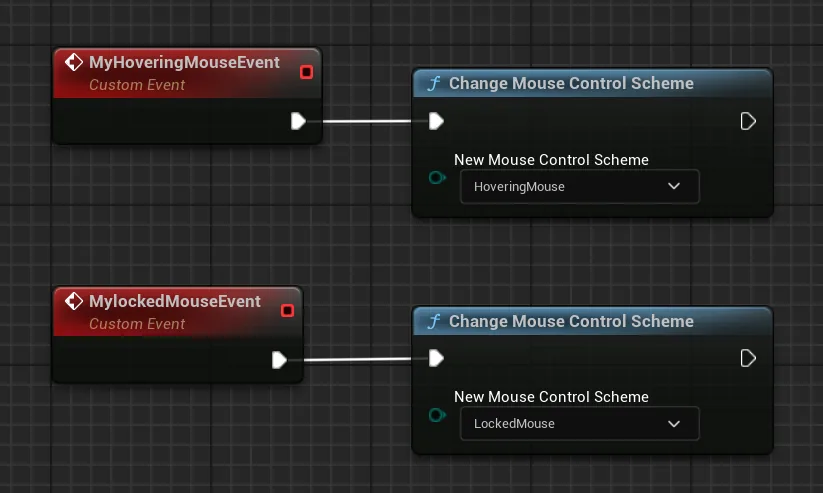
Without the plugin: add a PixelStreamingInput component to an actor, and send one of these with Send Pixel Streaming Response:
{"cmd":"switchMouseControlSchemeTo","value":"HoveringMouse"}{"cmd":"switchMouseControlSchemeTo","value":"LockedMouse"}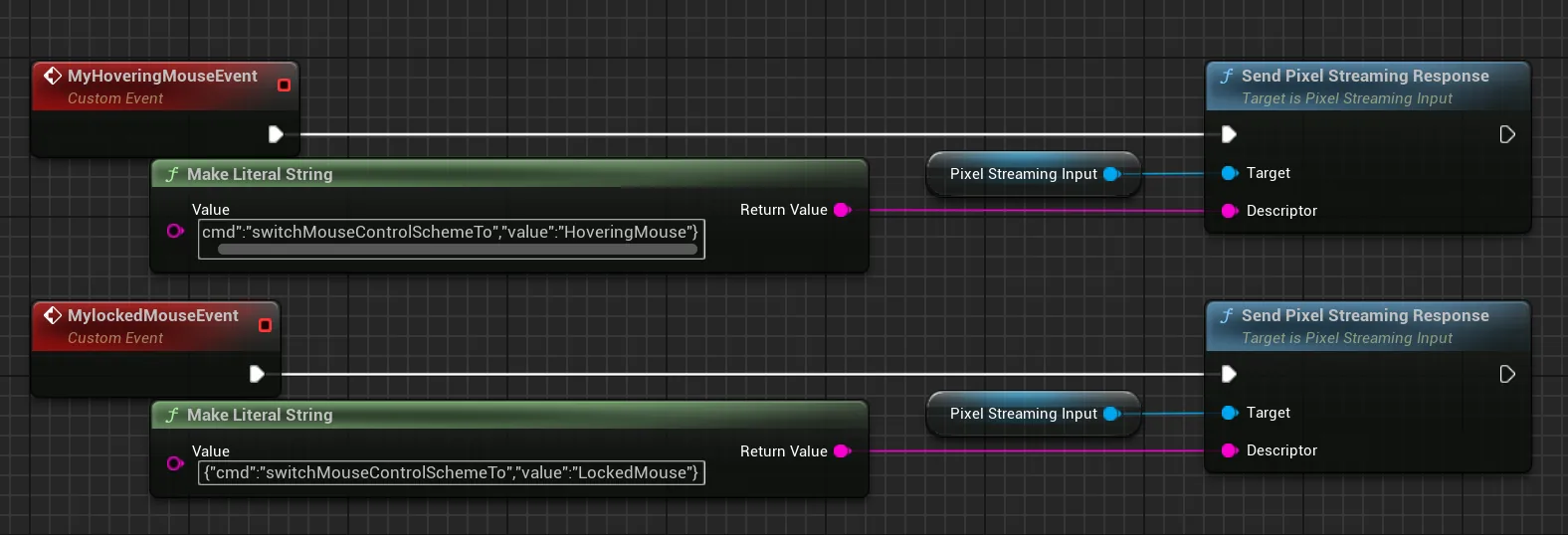
The same switch can be made from the page instead of from the app — see controlling the stream.
Fullscreen
Features API › Fullscreen: the same from your own page (iframe or Web SDK) or from your Unreal app, with demos and troubleshooting.
With a BP_E3DS_PS_Actor in the level, drag from your trigger's Pressed pin and add the E3DS toggle Fullscreen node. That is the whole Blueprint. (The screenshot shows the older node, named Toggle Fullscreen.)
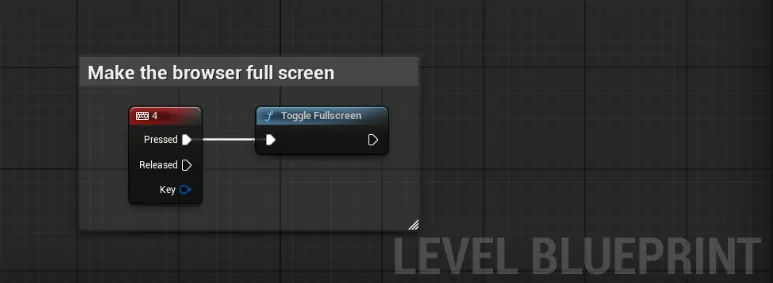
Pressing the key once puts the browser window into fullscreen; pressing it again leaves. If nothing happens, the viewport did not have focus — click into it first.
Fullscreen can also be driven from your own page, which is what you want when the button belongs to your interface rather than to the app: fullscreen from the page.
Controllers, on-screen keyboards, DLSS, and why audio starts muted.
Last updated