Send a file from the streaming machine to the viewer's device
On Eagle 3D Streaming, your Unreal app can hand the viewer a file it has on the streaming machine — a generated PDF, an exported model, a screenshot, a saved configuration — and the viewer's browser downloads it to their own device.
The direction here is streaming machine → viewer's device. For the other way, see receive a file from the viewer's device.
With the plugin
Place a BP_E3DS_PS_Actor in the level.
In the Level Blueprint, add your trigger (the demo uses the H key).
-
Add a Get Project File Path node with the path to the file, and feed it into the single node E3DS Transfer File From Unreal To User Browser. Compile and save. (The screenshot below shows the older two-node version, Construct PS Message To Download A File from Unreal App Directory To User's Device into Download A File From Unreal App Directory To User's Device; it does the same thing.)
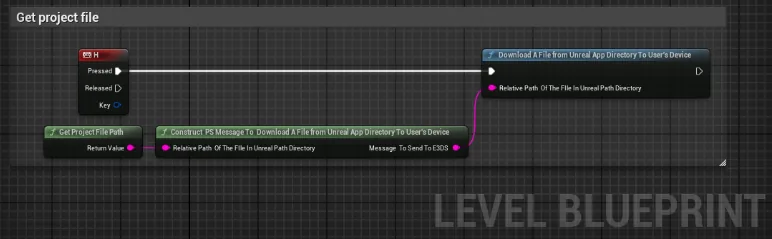
Press the key with the viewport focused and the file opens in a new browser
tab, which downloads it. Nothing happening almost always means the path is
wrong — the file must exist on the machine running your app, not on
yours. A missing file is reported as
EL Error:file does not exist: followed by the path.
Without the plugin
Send one of these with Send Pixel Streaming Response. fileToDownload is the
file’s full path on the streaming machine, for example:
C:/0.apps/YourCompany/YourApp/3/YourApp/Saved/Report.pdfNever type that path into your app: it is different on every streaming machine. Build it at run time —
Get Project Saved Directory → Convert Relative Path To Full → append the file
name (Report.pdf). The conversion matters: in a packaged app the directory nodes return a
relative path such as ../../../YourApp/Saved/, which the streaming machine cannot find.
Download the file to the viewer’s device
{"cmd": "downloadLocalFileOnUserDevice", "fileToDownload": "C:/0.apps/YourCompany/YourApp/3/YourApp/Saved/Report.pdf"}The file goes to public storage and the viewer’s browser opens it in a new tab, which downloads it — the same as the plugin node.
Get a download link instead
{"cmd": "getDownloadUrlOfLocalFile", "fileToDownload": "C:/0.apps/YourCompany/YourApp/3/YourApp/Saved/Report.pdf"}Nothing opens. The file goes to public storage and your app receives the link, to show or use as it likes:
{"type": "takeDownloadUrlOfLocalFile", "downloadURL": "https://...", "localFile": "C:/0.apps/YourCompany/YourApp/3/YourApp/Saved/Report.pdf"}The other direction: the viewer picks a file in their browser and it lands on the streaming machine.
Last updated